

Express Printer
The least you can spend and still print properly on ribbon
The Express is our entry-level ribbon printer, and at £650 it is the cheapest way into printing your own. A heated print head transfers foil onto satin, so the words are bonded into the ribbon rather than sitting on top of it – sharp, permanent, and ready to tie while the customer is still at the counter.
It prints at 300 dpi on ribbon from 7 to 100 mm, up to 1.27 m at a time, and it takes the same foils, the same adaptors and the same software as the Jets. Everything you need to print on the day it arrives is in the box, which is why there are no Express bundles to choose between.
Ribbon printing is all we do, and we have been doing it since 2006.

What you get for £650
- £650 Printer, software, external ribbon holder, narrow adaptor, cleaning pen, and a roll of foil and ribbon.
- 300 dpi Print resolution. Most ribbon printers are 200 dpi.
- 4 ips Print speed – about 16 minutes for a full 100 m roll.
- 1.27 m Longest print in a single run.
- 7–100 mm Ribbon widths it will print on.
- 200 m Foil roll length, in 30, 40, 55 and 105 mm (110 mm comes on 50 m rolls).
Full Express specifications, print samples and a tour of the software Express Printer Handbook – setup, software and troubleshooting Download the free Ribbon Print trial (Windows, 77 MB)
How the Express compares
| Express | Jet 300 | Jet 600 | Pro | |
|---|---|---|---|---|
| Price, printer only | £650 | £800 | £1,100 | £1,500 |
| Print resolution | 300 dpi | 300 dpi | 600 dpi | 300 dpi |
| Maximum printed length | 1.27 m | 2.5 m | 1.7 m | 1.4 m |
| Ribbon widths | 7–100 mm | 7–100 mm | 7–100 mm | 7–100 mm |
| Memory | 8 MB | 128 MB | 128 MB | 1 GB |
| Washcare and Medal Print foils | Yes | Yes | Yes | No |
| Bundles available | No – printer only | Four | Four | No |
| Best for | Starting out | Sashes and banners | The finest detail | All-day volume |
All four take the same 7 to 100 mm ribbon. The Express, the Jet 300 and the Jet 600 also share foils, adaptors and software, so consumables move between them and nothing is stranded if you start with an Express and add a Jet later. Full detail on the ribbon printers page.
Why 300 dpi rather than 200
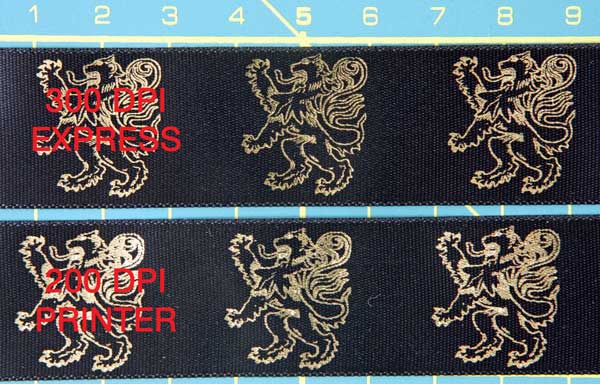
Half again as many dots per millimetre
Most ribbon printers are 200 dpi. The Express puts 50% more dots across every millimetre, so fine serifs, thin outlines and detailed crests stay crisp instead of breaking up – and light foils on dark ribbon come out solid rather than letting the ribbon show through the gaps. The sample here was printed on 25 mm ribbon, the Express print on top.
It is also what lets the Express print legibly on ribbon as narrow as 7 mm, which 200 dpi printers struggle with. See the full comparison and more samples.
What people print on an Express
- Gift ribbon and bowsA name on a gift ribbon while the customer waits.
- Funeral and memorial ribbonNames and dates on tributes and wreaths.
- Wedding ribbonFavours, bouquets, cake boards and invitations.
- Branded packaging ribbonYour logo and web address on every parcel.
- Award and sports-day ribbonsPlacings, house colours and school branding.
- Rosette tails and centresPlacings and show names on 25, 38 and 48 mm satin.
- Wash-care labelsPrinted with washcare foil so they survive laundering.
- Hamper and gift-box ribbonA brand or a message across the top of a hamper.
- Christmas ribbonPresents, hampers and window dressing.
- Everything you can print on ribbonThe full list, with printed costs per item.
Who buys one
Mostly small businesses adding personalisation to something they already sell, and people testing whether ribbon printing is worth doing before committing to a bigger machine.
- FloristsTributes, bouquets and named arrangements, printed the morning they are needed.
- Gift shopsPersonalised ribbon while the customer waits.
- Funeral directorsNames and dates, printed in-house the same day.
- Wedding suppliersFavours, chair sashes and cake ribbon.
- SchoolsSports day, prize giving and house colours.
- Party shopsBalloon ribbon and short sashes printed to order.
- Hamper businessesBranded ribbon across every hamper you send.
- Everyone else who uses oneThe full list of trades and what they print.
What you need alongside it
- Elan double-faced satinSatin both sides, 46 colours, 7 to 100 mm. For favours, gifts and anything tied in a bow.
- Elan single-faced satinSatin face, matt back, 40 colours. Cheaper per metre, and the back a pleating machine can grip.
- Ribbon printing foils30, 40, 55 and 105 mm on 200 m rolls, and 110 mm on 50 m, in around forty colours.
- Washcare foilsWaterproof and launderable, for care labels and anything that gets wet.
- Multi-adaptorsTwo to eight grooves, so one pass of foil prints several ribbons at once.
- External ribbon holderComes with the printer. A 100 m roll is too large for the printer body and feeds from this.
- Ribbon CutterA hot wire seals every end as it cuts, so nothing frays.
- Ribbon Print Software V5Included with the printer. The £100 price is for buying it on its own, without a machine.
Questions we are asked about the Express
Is the Express enough, or should I buy a Jet?
For most work starting out, it is enough: the same 7 to 100 mm ribbon, the same foils and the same 300 dpi as the Jet 300. Two things send people to a Jet. Prints longer than 1.27 m – sashes and banners – need the Jet 600 at 1.7 m or the Jet 300 at 2.5 m. And 600 dpi on the Jet 600 shows on 7 to 15 mm ribbon, script fonts and fine logos. If neither applies, the Express does the same job for £450 less. Tell us what you make and we will say which, and send you the 300 versus 600 dpi test print.
What comes with it?
The printer, the Ribbon Print design software, the external ribbon holder, the narrow-ribbon adaptor, a print-head cleaning pen, a USB cable, the power supply, and one roll each of foil and ribbon in a colour and width of your choosing. There are no Express bundles, because everything you need to print on day one is already in the box.
Do I need a computer?
Yes. The Express connects by USB to a Windows PC or laptop running Ribbon Print V5. Windows 7 or later; Mac is not supported at this time. The software is included with the printer, and there is a free trial anyone can download and try before buying.
What ribbon can I print on?
Thermal transfer foil needs a printer-grade satin to bond to. Our Elan woven-edge satin is made to our own specification for exactly this – 46 colours double-faced, 40 single-faced, 7 to 100 mm. Ordinary craft satin, grosgrain, organza and cotton print badly on any thermal ribbon printer. If a roll of Elan does not print well on a Ribbon Print printer with our foils, we replace it.
What does a printed metre cost?
Ribbon plus foil, in pence: about 13.1p at 15 mm in black foil, 14.5p at 25 mm, 18.8p at 38 mm and 50p at 100 mm. Printing several ribbons side by side on a multi-adaptor divides the foil cost by the number of channels – five-up on 15 mm is about 8.6p. The full cost-and-margin table is on the ribbon printers page.
Do I need an adaptor?
Ribbon under 25 mm needs one to hold it straight under the print head, and the narrow poly adaptor that does that is in the box. Ribbon of 25 mm and wider feeds straight in. The optional multi-adaptors are the volume upgrade – two to eight grooves, so one pass of foil prints several ribbons at once.
Can I print labels that survive washing?
Yes, with washcare foil rather than standard transfer foil. It is waterproof and made to be laundered, and comes in 30, 55 and 105 mm so it runs in the same adaptors as any other foil. The Express takes washcare and Medal Print foils; the Pro does not.
What support do I get?
UK-based technical support by phone or WhatsApp, from the same small team that sells you the printer. Print heads and front rollers are user-replaceable and kept in stock, and the Express Printer Handbook covers setup, the software and troubleshooting step by step.
How quickly will it arrive?
UK orders placed before 1 pm on a working day are dispatched the same day for next-business-day delivery. Orders placed after 1 pm, or at the weekend, go out the next working day.
Not sure whether the Express is enough for what you make? Tell us what you print, how wide and how much of it, and we will tell you honestly – including when a Jet is the better buy. Get in touch or call +44 (0) 203 397 4117.